Upgrading 3D bioprinter capabilities for a global biotech company
About the client
CELLINK (part of BICO) is a world-leading innovator in the development of bioprinters and biomaterials. Since developing the world’s first universal bioink, CELLINK has been combining biology, engineering, and computing to become a recognized equipment provider for bioscience research labs in over 65 countries.


The challenge
CELLINK was actively working on improvements in its existing 3D bioprinter models and developing new features for a new model. To speed up the delivery, the company looked for additional expertise in the various embedded technologies these devices rely on.
Delivered value
The solution
First of all, CELLINK sent us their BIO X printer right away so the engineers could then integrate the changes and run issue fixes and new feature verification on real hardware. As soon as we received the device in our embedded lab, engineers started work on several system components:
- Microcontroller
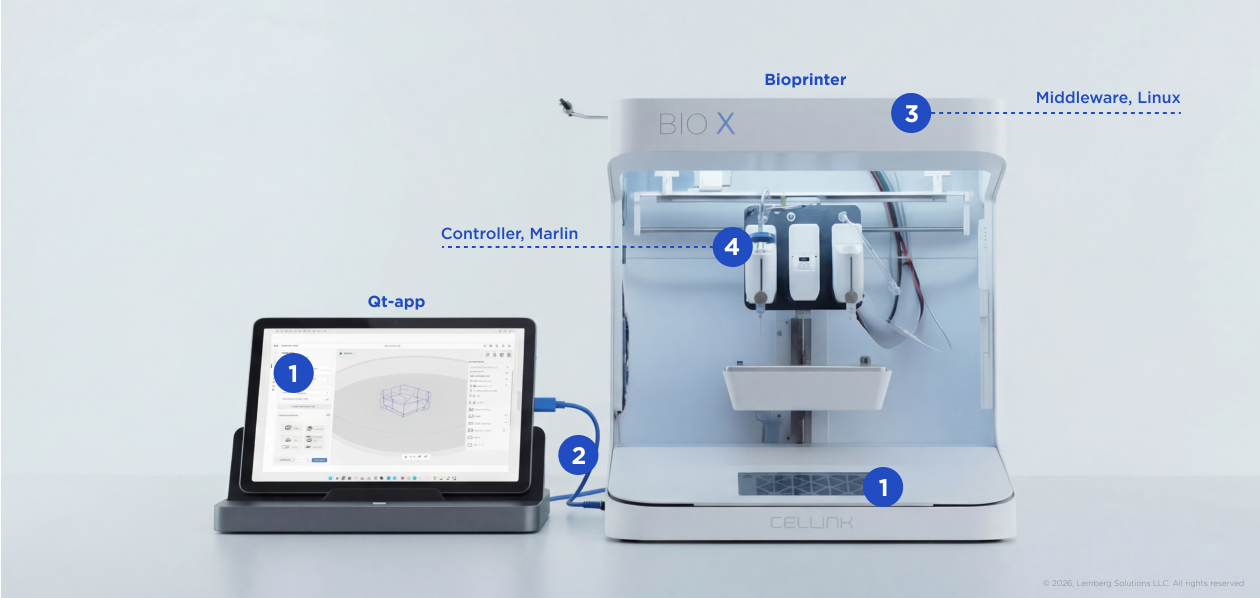

The “brain” of CELLINK’s bioprinters is the MCU running Marlin — a firmware used in the vast majority of 3D printers to control the printhead movements and actions. This technology allows the client to adapt the controller functionality to the specifics of bioprinters, such as refrigerated or gentle, low-pressure extrusion that helps keep cells alive, or to work with multiple material types in a single session.
Our engineers used their expertise in Marlin to help develop new functions in bioprinters, such as coaxial and mixing printing, and ensure these functions work properly.
- Qt applications
The printers’ GUI (in BIO X models) and connected tablets run Qt applications that users can directly interact with to set up the printing process. Among the new functions for these applications, we worked on a feature that allows users to create 3D models from scratch on the tablet.
Qt is a cross-platform technology based on C++, so it is used for both user-facing applications — on the device GUI and on the tablet. Since the bioprinter models we worked on had different configurations, we used Qt widgets to develop the Windows app for the tablet and the QML technology for the onboard Qt apps.
- Middleware
The Qt application communicates with the printer’s controller through the middleware with an embedded Linux OS. As the central connective element, it hosts multiple applications and services essential for the entire system. Expertise in Linux was handy for all work related to fixing bugs and delivering all new features. To ensure efficient data transmission between the system components, we relied on a predefined communication protocol.
- Customer portal
To provide their clients with constant support, CELLINK created a customer portal running on Flutter Web. Our engineer helped to connect the front-end of the Z-stack files page to the back-end of another product, CELLCYTE X, an automated imaging platform. This allows users to securely monitor images taken by CELLCYTE X.
How it works