Increasing accessibility of an assistive smart home solution
About the client
Unwired Things is a Danish company specializing in developing innovative assistive products for visually impaired people. The founder created the company with a vision of using advances in IoT and other technologies to revolutionize assistive products with new multi-language spoken capabilities and lower costs for customers.


The challenge
Previously, the client had developed a controller functioning as a universal remote with a voice interface for smart home devices. The controller, at the core of the solution, provides the spoken feedback to blind users.
The system's design was based on the ability to update the controller with new firmware capabilities over time via a mobile phone app. Without in-house app development skills, however, the client needed external services to create a solution that would deliver a flawless user experience and allow users to manage the controller themselves.
Delivered value
The solution
To deliver a simple, self-contained application, our team focused on creating an accessibility-first edge architecture with app-to-controller communication.
Immediate controller feedback
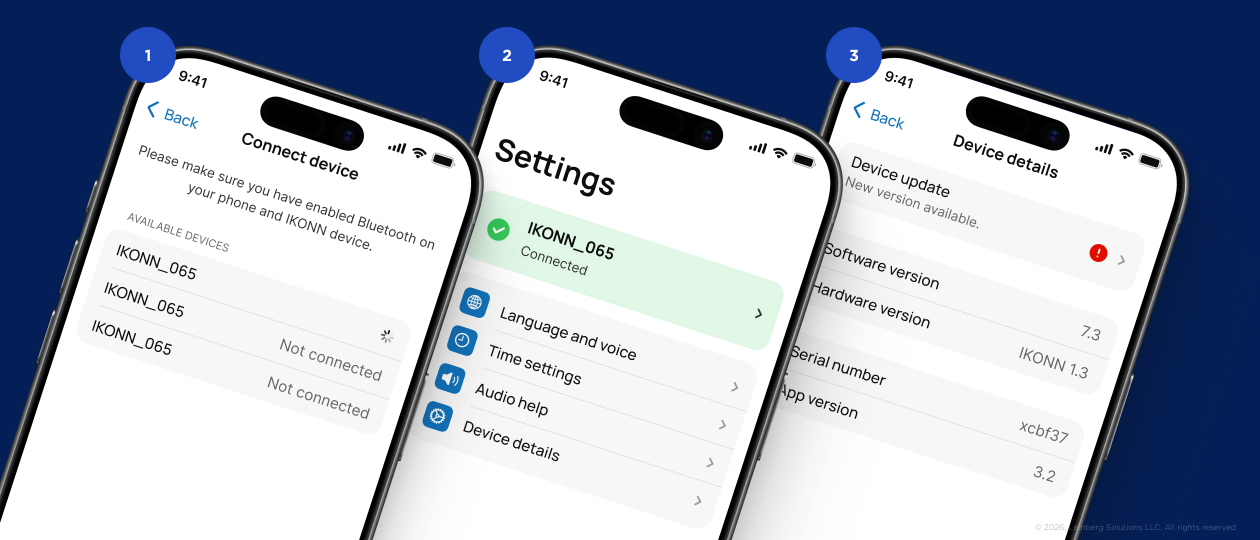

First of all, app users should be able to upload new firmware and voice packages directly from the mobile app to the device. Also, it is important that they get information about the controller status changes in real time. For this, we implemented a service layer acting as the app's local engine that stores static data and manages real-time communication with the remote control.
Gesture-based screen reader
The application UI must respond precisely: when a user touches a part of the screen, the app should the element under their finger and describe its purpose clearly. SwiftUI provided a convenient way to implement this, allowing us to add a special accessibility metadata layer. It consists of labels and hints invisible to the eye but readable to the iPhone’s VoiceOver, which helps create a clean but functional UI. We intentionally avoided complex menus to prevent users from getting lost in a subdirectory.
Optimized battery consumption
While firmware updates or language changes happen occasionally, device status updates or voice selection are quite frequent actions. Also, firmware and language pack files are large compared to the lightweight daily signals between the controller and app. To provide optimal battery usage and appropriate data travel speeds, we implemented two connectivity channels:
- BLE (Bluetooth Low Energy) for simple, instant commands like alerts, changing the voice, language, or setting the time. It enables the app and the remote to stay connected using very little power.
- Local Wi-Fi with higher connectivity speed and bandwidth for transferring heavy firmware and new language packs. The remote creates a temporary, private Wi-Fi access point and provides the app with credentials to it via BLE. The iPhone connects to this signal and pushes the file across within seconds. Once the transfer is done, the Wi-Fi shuts off to save power.
The result is a user-centered mobile app that augments the client’s smart home product line with additional accessibility. Now, users can easily update their controllers with new firmware or language and use the app to set up basic controller features: time, language selection, or voice announcements.
We found Lemberg Solutions to be a very professional partner. We had a deep knowledge of embedded systems, but lacked the skills to create an iOS app with the right capabilities. The Lemberg team worked to map out the usability requirements and challenged us on some key design aspects to create a better product, which we appreciated.
The team met the agreed deadlines, and communication was smooth and pleasant at every step.

How it works